Поиск по сообщениям в этом блоге

Loading
Показаны сообщения с ярлыком images. Показать все сообщения

суббота, 5 марта 2011 г.

Неограниченный объем для хранения фотографий и видео малых размеров в Picasa Web Albums

В доступном для хранения данных объеме пространства Веб-альбомов Picasa больше не учитываются загруженные изображения разрешением менее 800 пикселей и видео длительностью менее 15 минут. Таким образом, Веб-альбомы Picasa теперь позволяют загружать и хранить абсолютно бесплатно неограниченное количество фотографий и видео, удовлетворяющих указанным параметрам, без влияния на свободное место в один гигабайт, предоставляемое бесплатно, или на дополнительное пространство, предоставляемое за плату.
Хотя данная возможность появилась еще в феврале, Google официально сообщил об этом в своем блоге только сейчас.
Проверить уровень использования имеющегося пространства можно непосредственно в настройках Picasa Web Albums, либо в аккаунте.

Отправлено пользователем Express через Google Reader:

источник: Google Photos Blog, Автор: Picasa Team, дата: 04.03.11

Posted by Matt Steiner, Engineering Lead-Photos Team

With Picasa Web Albums, you automatically get one gigabyte of free storage. As some of you may have noticed, we recently changed the way storage works so you can continue to share and store images even after you fill up that free gig.

In the past, each image and video you uploaded counted toward your free 1GB. Now, uploaded images that are 800 pixels or smaller and videos that are 15 minutes or less in length no longer count against your free storage limit. This means you can upload and store unlimited photos and videos at the above sizes -- for free!

800-pixels is a good size for sharing pictures on the web, but if you prefer uploading your images at a larger size for better quality (archival or print), and you are nearing the 1GB limit, you can always purchase additional storage for as little as $5/year. To check your available storage amount scroll to the bottom of your home page or view your settings.

For those of you who've already purchased additional storage, any existing 800-pixel images or videos shorter than 15 minutes will no longer count toward your storage limit, so enjoy the extra space and post away!

We hope you enjoy the change, and we'd love to hear what you think.

Здесь вы можете:

четверг, 17 февраля 2011 г.

Новая навигационная панель Google

В англоязычном интерфейсе отдельных сервисов Google (пока это Google Search, Google Image Search, Google Instant Search, Google Maps и Gmail) обновлена панель навигации:
- доступ к настройкам сгруппирован вместо отдельных ссылок в раскрывающемся меню единого значка (как "гаечном ключе" Google Chrome);
- ссылки на сервисы более адаптированы для использования на сенсорных устройствах, а также вместо подчеркивания выделяются надстрочным цветом;
- показывается не адрес электронной почты активного аккаунта, а имя владельца;
- немного усложнен доступ к переключению аккаунтов в случае использования функций множественного входа или делегирования почты.

Отправлено пользователем ­­­­­­­­­­­­ через Google Reader:

источник: Google Operating System, Автор: Alex Chitu, дата: 17.02.11

The new navigation bar is slowly rolled out to all Google users. After more than 6 months of testing, the new navigation bar removes the clutter by grouping extraneous links in a menu inspired by Google Chrome. It also removes link underlining and replaces it with a colored bar. There's more spacing between the links, so the new navigation bar works better on a touchscreen device.


Another change is that Google shows your name instead of your email address. For some reason, Google doesn't link to the Google Profile and makes it more difficult to switch to a different account if you use multiple sign-in or Gmail delegation. Now you need to click "Switch account" to see the list of accounts you can use.


Unfortunately, Google didn't manage to add the bar to all its services, so you'll only see it if you use Google Web Search, Google Image Search, Google Realtime Search, Google Maps and Gmail.

{ Thanks, Benjamin and Locutus.}


Здесь вы можете:

вторник, 20 июля 2010 г.

Google Images меняет интерфейс

В официальном блоге Google сообщается об изменении в течение нескольких дней интерфейса Google Images. Все результаты поиска изображений теперь будут представлены на одной странице с минимальными интервалами для эффективного использования площади, и при наведении курсора мыши на выбранную картинку, она будет отображаться в увеличенном виде во всплывающем окне.
Переключиться на прежний интерфейс Картинок Google с постраничным отображением результатов можно нажав на ссылку внизу страницы "Переключитесь на упрощенную версию" ("Switch to basic version") или добавив в конце адресной строки параметр &sout=1. Такой вариант может пригодиться пользователям Интернет с медленным каналом или ограниченным трафиком, но реализация переключения с необходимостью прокрутки вниз страницы крайне неудобна, а возврат к постраничным результатам сохраняется только для текущей вкладки.

Отправлено пользователем Anonymous через Google Reader:

источник: The Official Google Blog, Автор: A Googler, дата: 20.07.10

When you think about "information," what probably comes to mind are streams of words and numbers. Google's pretty good at organizing these types of information, but consider all the things you can't express with words: what does it look like in the middle of a sandstorm? What are some great examples of Art Nouveau architecture? Should I consider wedding cupcakes instead of a traditional cake?

This is why we built Google Images in 2001. We realized that for many searches, the best answer wasn't text—it was an image or a set of images. The service has grown quite a bit since then. In 2001, we indexed around 250 million images. By 2005, we had indexed over 1 billion. And today, we have an index of over 10 billion images.

It's not just about quantity, though. Over the past decade we've been baking deep computer science into Google Images to make it even faster and easier for you to find precisely the right images. We not only find images for pretty much anything you type in; we can also instantly pull out images of clip art, line drawings, faces and even colors.

There's even more sophisticated computer vision technology powering our "Similar images" tool. For example, did you know there are nine subspecies of leopards, each with a distinct pattern of spots? Google Images can recognize the difference, returning just leopards of a particular subspecies. It can tell you the name of the subspecies in a particular image—even if that image isn't labeled—because other similar leopard images on the web are labeled with that subspecies's name.

And our "Similar colors" refinement doesn't just return images based on the overall color of an image. If it did, lots of images would simply be classified as "white." If you're looking for [tulips] and you refine results to "white," you really want images in which the tulips themselves are white—not the surrounding image. It takes some heavy-duty algorithmic wizardry and processing power for a search engine to understand what the items of interest are in all the images out there.

Those are just a few of the technologies we've built to make Google Images more useful. Meanwhile, the quantity and variety of images on the web has ballooned since 2001, and images have become one of the most popular types of content people search for. So over the next few days we're rolling out an update to Google Images to match the scope and beauty of this fast-growing visual web, and to bring to the surface some of the powerful technology behind Images.

Here's what's new in this refreshed design of Google Images:
  • Dense tiled layout designed to make it easy to look at lots of images at once. We want to get the app out of the way so you can find what you're really looking for.
  • Instant scrolling between pages, without letting you get lost in the images. You can now get up to 1,000 images, all in one scrolling page. And we'll show small, unobtrusive page numbers so you don't lose track of where you are.
  • Larger thumbnail previews on the results page, designed for modern browsers and high-res screens.
  • A hover pane that appears when you mouse over a given thumbnail image, giving you a larger preview, more info about the image and other image-specific features such as "Similar images."
  • Once you click on an image, you're taken to a new landing page that displays a large image in context, with the website it's hosted on visible right behind it. Click anywhere outside the image, and you're right in the original page where you can learn more about the source and context.
  • Optimized keyboard navigation for faster scrolling through many pages, taking advantage of standard web keyboard shortcuts such as Page Up / Page Down. It's all about getting you to the info you need quickly, so you can get on with actually building that treehouse or buying those flowers.

And for our advertisers, we're launching a new ad format called Image Search Ads. These ads appear only on Google Images, and they let you include a thumbnail image alongside your lines of text. Check out our Help Center for more info on how try them out; we hope they're a useful way to reach folks who are specifically looking for images.

These upgrades are rolling out in most of our local interfaces worldwide over the next few days. We hope they not only make it easier to search for images, but also contribute to a better aesthetic experience. We see images as a major source of inspiration, a way of connecting the world—and their growth is showing no signs of slowing down. We'll work to make sure Google Images continues to evolve to keep up.

Posted by Nate Smith, Product Manager, Google Images


Здесь вы можете:

среда, 17 февраля 2010 г.

Google продемонстрировал перевод слов с фотографии

Google продемонстрировал на Mobile World Congress в Барселоне прототип сервиса на основе Google Goggles, способный производить перевод текста с фотографии.


Отправлено пользователем Anonymous через Google Reader:

источник: The Official Google Blog, Автор: A Googler, дата: 17.02.10
Imagine being in a foreign country staring at a restaurant menu you can't understand, a waiter impatiently tapping his foot at your tableside. You, a vegetarian, have no idea whether you're about to order spaghetti with meatballs or veggie pesto. What would you do? Well, eventually you might be able to take out your mobile phone, snap a photo with Google Goggles, and instantly view that menu translated into your language. Of course, that's not possible today — but yesterday at the Mobile World Congress we demonstrated a prototype of Google Goggles that has the power to do just that. It's still in an extremely early stage, but we thought we'd share this demo with you because it shows just how powerful a smartphone can be when it's connected to our translation technologies. For more information and to watch the demo, check out our brand-new Google Translate blog.

Posted by Andrew Gomez, Associate Product Marketing Manager

Здесь вы можете:

понедельник, 7 декабря 2009 г.

В Google Labs запущен сервис поиска по фотографиям Google Goggles


В Google Labs запущен сервис Google Goggles, позволяющий осуществлять поиск Google с использованием фотографий, полученных из камер телефонов и других мобильных устройств под управлением ОС Android 1.6+. Сервис принимает изображения в качестве входных данных и обрабатывает с использованием систем распознавания изображений (распознавания объектов, OCR, сопоставления лиц и т. д.) для возвращения релевантных результатов поиска.


Отправлено вам пользователем Anonymous через Google Reader:

источник: Google Labs, , дата: 07.12.09
Google Goggles lets you search Google using pictures from your camera phones. We take an image as input, and using several image recognition backends (object recognition, OCR, face matching, etc), we return relevant search results.

Здесь вы можете:

среда, 18 ноября 2009 г.

Новый экспериментальный сервис поиска похожих изображений Google Image Swirl

Google запустил в Google Labs новый экспериментальный сервис под названием Image Swirl, основанный на новых технологиях компьютергого визуального поиска. Image Swirl расширяет технологии сервисов Similar Images и Picasa Face Recognition, организуя поиск по группам похожих изображений и построение иерархий из этих групп. Каждый эскиз-миниатюра на начальной странице результатов поиска представляет собой алгоритмически определенный типичный образец группы изображений со схожими внешностью и смыслом.

Отправлено пользователем Anonymous через Google Reader:

источник: The Official Google Blog, Автор: A Googler, дата: 17.11.09
Back in 2001, to give people a new, quicker way to find images, we launched Image Search. When you do a search for [eiffel tower] you'll find an array of images of the tower in the daytime, in black and white, at sunset and more. With Similar Images, which recently graduated from Google Labs, you can click "Find similar images" to narrow your search to, say, pictures of the Eiffel Tower lit up at night. Today, we've launched an experimental feature in Labs called Google Image Swirl, which builds on new computer vision research to cluster similar images into representative groups in a fun, exploratory interface.

For example, if you search on Image Swirl for [washington], you'll see 12 image thumbnails including President Washington, the Washington Monument, a map of Washington D.C. and the Capitol Building:


Once you find the group of images you're interested in, you can click on the thumbnail and a cluster of images will "swirl" into view. For example, here's what you'll see if you click the image of the Washington Monument:


You can then further explore additional sub-groups within any cluster. The interface may look familiar to those of you who have tried Google's Wonder Wheel available in the Search Options panel, which enables you to explore related search queries.

Image Swirl expands on technologies developed for Similar Images and Picasa Face Recognition to discern how images should be grouped together and build hierarchies out of these groups. Each thumbnail on the initial results page represents an algorithmically-determined representative group of images with similar appearance and meaning. These aren't just the most relevant images — they are the most relevant groups of images.

Image Swirl currently works for more than 200,000 queries and we plan to include more queries in the future. Available queries will auto-complete as you start to type in the search box, similar to Google Suggest.

You can try out Google Image Swirl in Google Labs today. The feature is experimental and the underlying technology is a work in progress, so please share your feedback and let us know how we can make it more useful.

Posted by Aparna Chennapragada, Product Manager, and Yushi Jing, Google Research

Здесь вы можете:

пятница, 16 октября 2009 г.

Новый интерфейс Поиска картинок Google

Отправлено вам пользователем Anonymous через Google Reader:

источник: Google Russia Blog, Автор: hamlet, дата: 16.10.09
Михаил Дайчик, менеджер продуктов Google

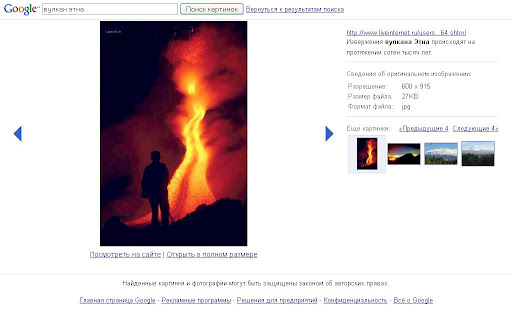
Команда Google Россия рада представить вашему вниманию новый интерфейс Поиска картинок.

Теперь клик на результат поиска ведет на страницу с крупным изображением и возможностью удобного пролистывания.


Важно также отметить, что новый интерфейс доступен только из России и некоторых других стран с похожими поисковыми традициями. Разница между привычками пользователей в разных странах довольно заметна, и мы стремимся их максимально учитывать при разработке наших сервисов.

Здесь вы можете: