Поиск по сообщениям в этом блоге

Loading
Показаны сообщения с ярлыком google voice. Показать все сообщения

среда, 25 августа 2010 г.

Телефонные звонки из Gmail

Google сразу в нескольких своих официальных блогах (Official Google Blog, Gmail Blog, Google Voice Blog, Google Talkabout) сообщил о появившейся возможности совершать телефонные звонки прямо из Gmail.

Отправлено пользователем Anonymous через Google Reader:

источник: The Official Google Blog, Автор: A Googler, дата: 25.08.10

(Cross-posted from the Gmail Blog)

Gmail voice and video chat makes it easy to stay in touch with friends and family using your computer's microphone and speakers. But until now, this required both people to be at their computers, signed into Gmail at the same time. Given that most of us don't spend all day in front of our computers, we thought, "wouldn't it be nice if you could call people directly on their phones?"

Starting today, you can call any phone right from Gmail.


Calls to the U.S. and Canada will be free for at least the rest of the year and calls to other countries will be billed at our very low rates. We worked hard to make these rates really cheap (see comparison table) with calls to the U.K., France, Germany, China, Japan—and many more countries—for as little as $0.02 per minute.

Dialing a phone number works just like a normal phone. Just click "Call phone" at the top of your chat list and dial a number or enter a contact's name.


We've been testing this feature internally and have found it to be useful in a lot of situations, ranging from making a quick call to a restaurant, to placing a call when you're in an area with bad reception.

If you have a Google Voice phone number, calls made from Gmail will display this number as the outbound caller ID. And if you decide to, you can receive calls made to this number right inside Gmail (see instructions).

We're rolling out this feature to U.S. based Gmail users over the next few days, so you'll be ready to get started once "Call Phones" shows up in your chat list (you will need to install the voice and video plug-in if you haven't already). If you're not a U.S. based user—or if you're using Google Apps for your school or business—then you won't see it quite yet. We're working on making this available more broadly—so stay tuned!

For more information, visit gmail.com/call.

Posted by Robin Schriebman, Software Engineer

Здесь вы можете:

вторник, 3 августа 2010 г.

Multiple sign-in теперь доступен для некоторых продуктов Google.

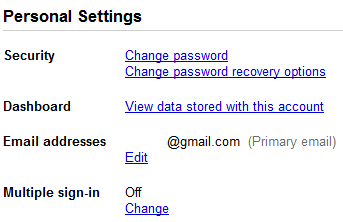
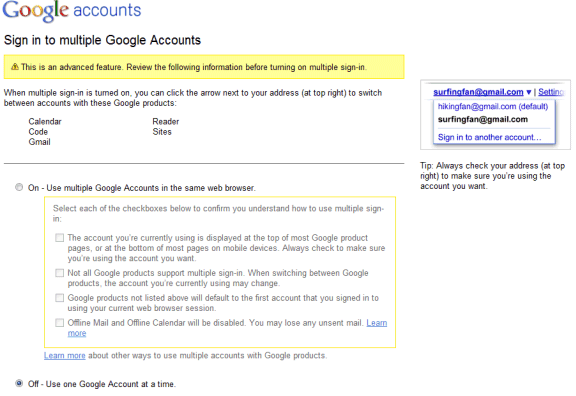
Функция множественного входа (Multiple sign-in), находившаяся ранее в стадии тестирования, стала доступна пользователям Google. Она позволяет одновременную работу в нескольких аккаунтах Google. В справке указывается на ограничение, что одновременный вход возможен максимально в три аккаунта. Перечень продуктов с поддержкой множественного входа пока небольшой: Google Calendar, Google Code, Gmail, Google Reader, Google Sitesсправке также фигурируют Google Voice и Google Docs (последний с пометкой "скоро")). Все перечисленные сервисы имеют SSL-шифрование. Включение функции возможно со страницы Google Accounts.

Отправлено пользователем Anonymous через Google Reader:

источник: Google Operating System, Автор: Alex Chitu, дата: 03.08.10

Google is rolling out a feature I mentioned in a previous post: signing in to multiple Google accounts simultaneously from the same browser. When you go to the Google accounts page, you might see a new option: "multiple sign-in". If you don't see the new feature, it will probably be enabled soon.


After clicking on the "change" link, Google informs that this is an advanced feature and that it will only work for Gmail, Google Calendar, Google Sites, Google Reader, Google Voice, App Engine and Google Code. When multiple sign-in is enabled, a drop-down is displayed next to your email address at the top of the page, so you can quickly switch to a new account.

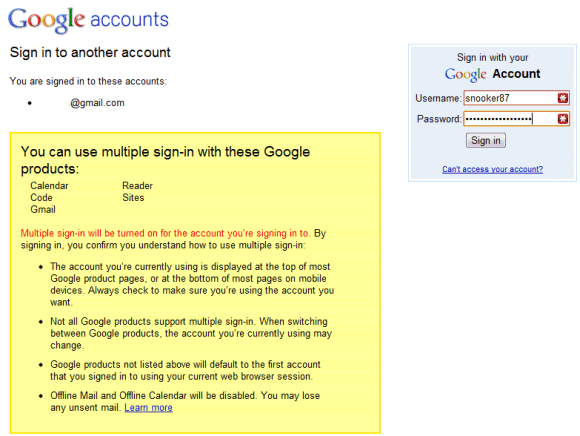
"If you use multiple sign-in, the first account you sign in to will be your default account. If you visit other Google products that don't support multiple accounts after you've signed in, you will automatically sign in to your default account for that product. If you sign out of any Google product while signed in to any account, you will be signed out of all your Google Accounts at once." (Google help center)


When you enable this feature, the most significant change is that you'll see a new drop-down next to your email address in Gmail and other supported Google products. Click on the drop-down and you can sign in to a new Google Account without signing out from the previous account.

Another change is that Google's URLs include a different number for each account: http://mail.google.com/mail/u/0/, http://mail.google.com/mail/u/1/, etc.


Google's help center explains that Google's services didn't allow you to sign it to multiple accounts at the same time using the same browser because Google uses sign-in cookies that only let you sign in with one account at a time. Obviously, you can use multiple browsers, Chrome's incognito mode, IE8's "new session" feature, multiple profiles, but the new Google feature makes things easier. Now you can read your messages from two or more Gmail accounts by opening Gmail in multiple tabs.

There are some known issues related to multiple sign-in: this feature is not available on mobile devices, Google Calendar's gadget doesn't work properly in Gmail, you can no longer use offline Gmail and offline Google Calendar and the "note in Reader" bookmarklet only works for the default account.

{ Thank you, Stefan and Max. }

Здесь вы можете: