Поиск по сообщениям в этом блоге

Loading

среда, 11 августа 2010 г.

Обновление Google Chrome Stable Channel до версии 5.0.375.126

Стабильная версия Google Chrome для Linux, Mac и Windows обновлена до 5.0.375.126. Данная версия содержит обновление Flash-плагина.

Отправлено пользователем Anonymous через Google Reader:

источник: Google Chrome Releases, Автор: Jason Kersey, дата: 10.08.10


Google Chrome 5.0.375.126 has been released to the Stable channel on Linux, Mac, and Windows. This version contains an updated version of the Flash plugin.

If you find issues, please let us know: http://code.google.com/p/chromium/issues/entry

Jason Kersey
Google Chrome

Здесь вы можете:

вторник, 10 августа 2010 г.

Информация о пробках в тестовом режиме на картах Google

Отправлено пользователем Anonymous через Google Reader:

Информация о пробках в тестовом режиме на картах Google

источник: Google Russia Blog, Автор: Борис Хвостиченко, дата: 10.08.10

Борис Хвостиченко, менеджер по продуктам Google
Сегодня мы запускаем в тестовом режиме сервис, сообщающий информацию о пробках на дорогах Москвы и Санкт-Петербурга. Для того чтобы увидеть его на карте, вам нужно включить слой "Пробки" (справа вверху на картах). Пока данные доступны только для этих городов, но мы работаем над тем, чтобы расширить покрытие.

Текущие московские пробки
Для обозначения дорожной ситуации мы используем 4 цвета, которые означают следующее(в скобках приведены соответствующие скорости для дорог с разрешенной максимальной скоростью 60 км/ч):
  • черно-красные полоски - все плохо, движение минимальное, не более 15% разрешенной скорости (до 10 км/ч)
  • красный - сильно затрудненное движение, не более 40% разрешенной скорости (10-25 км/ч)
  • желтый - движение с затруднениями, до 75% скорости (25-45 км/ч)
  • зеленый - движение без помех (от 45 км/ч и выше)
Немного о том, откуда мы берем данные по пробкам. Одна часть информации приходит от наших поставщиков, а другая - от пользователей мобильных карт Google. Далее с помощью специальных алгоритмов информация обрабатывается и после этого отображается на карте. Естественно, при этом приходится решать множество вопросов: например, как определить пешеходов и не принимать во внимание полученные от них данные, потому что они практически всегда движутся медленнее, чем автомобили. Мы говорим "практически", потому что в больших городах, как вы знаете, бывает случаи, когда пешеход обгоняет автомобиль :(
Одновременно с этим мы храним историю данных, и вы можете посмотреть не только текущую дорожную обстановку, но и пробки в определенное время и определенный день недели. Например, если вы хотите проверить, как обстоят дела на дороге к вашей даче в в пятницу днем, то выглядеть это будет так:

Московские пробки в пятницу днем
Одновременно с обычными картами пробки стали доступны и на мобильных картах Google (или наберите m.google.ru/maps в вашем мобильном), для этого просто надо включить соответствующий слой на карте. Напомню, что мобильные карты Google доступны для телефонов Nokia с операционной системой S60, для iPhone, для Android и для Windows Mobile. Вот как выглядят пробки на телефоне c ОС Android 2.1:

Пробки на Android 2.1
Удачи на дорогах!


Здесь вы можете:

понедельник, 9 августа 2010 г.

Конвертация загруженных документов в списке Google Docs

В Google Docs стала возможна конвертация файлов в формат Документов Google не только при загрузке, но и для уже загруженных файлов. При этом исходный файл остается не преобразованным, а создается его копия, сконвертированная в формат Google Docs.
Преобразование возможно для следующих типов файлов:
- для таблиц: .xls, .xlsx, .ods, .csv, .tsv, .txt, .tsb
- для документов: .doc, .docx, .html, .txt, .rtf
- для презентаций: .ppt, .pps
- для OCR: .jpg, .gif, .png, .pdf
Преобразование файлов производится из списка документов при вызове меню нажатием правой кнопки мыши на файле. При этом появляется пункт меню "Преобразовать в формат Документов Google" ("Make a Google Docs copy"). Пакетное преобразование сразу нескольких выделенных файлов, а также обратная конвертация не доступны.
Функции независимого копирования (без перемещения или создания зависимых дубликатов) документов и папок в Google Docs из списка так и не предусмотрено.

Отправлено пользователем Anonymous через Google Reader:

источник: Docs Blog, Автор: Google Docs, дата: 09.08.10

Today, we're happy to announce that you can now convert files already uploaded to your documents list into a Google Docs format. Previously, this option was only available on upload.

This addition includes converting image and PDF files to text using our recently added Optical Character Recognition (OCR) technology. The full list of files that can be converted include:
  • For spreadsheets: .xls, .xlsx, .ods, .csv, .tsv, .txt, .tsb
  • For documents: .doc, .docx, .html, plain text (.txt), .rtf
  • For presentations: .ppt, .pps
  • For OCR: .jpg, .gif, .png, .pdf
To convert your file, right-click on it while in the document list and select Make a Google Docs copy. This option leaves your original file in place and adds a new Google Docs copy to your docs list.


Now you convert your old files and collaborate on them in cloud. We hope you enjoy it! Let us know if you have feedback or suggestions.

Posted by: Jim McMaster, Software Engineer

Здесь вы можете:

пятница, 6 августа 2010 г.

Google приобрел Slide

Google сообщил об очередном приобретении - компании Slide, специализирующейся на сетевых социальных технологиях.

Отправлено пользователем Anonymous через Google Reader:

источник: The Official Google Blog, Автор: A Googler, дата: 06.08.10

We're excited to announce we've acquired Slide, a social technology company with an extensive history of building new ways for people to connect with others across numerous platforms online.

For Google, the web is about people, and we're working to develop open, transparent and interesting (and fun!) ways to allow our users to take full advantage of how technology can bring them closer to friends and family and provide useful information just for them.

Slide has already created compelling social experiences for tens of millions of people across many platforms, and we've already built strong social elements into products like Gmail, Docs, Blogger, Picasa and YouTube. As the Slide team joins Google, we'll be investing even more to make Google services socially aware and expand these capabilities for our users across the web.

While we don't have any detailed product plans to share right now, we're thrilled to welcome Max and his very talented team to Google, and we can't wait to work together to give people more and better tools to communicate and connect.

Posted by David Glazer, Engineering Director

Здесь вы можете:

четверг, 5 августа 2010 г.

Доступ к Gmail с нескольких аккаунтов одновременно в одном браузере

Google официально сообщил в Gmail Blog о возможности использования функции множественного входа (Multiple sign-in) в Gmail. Как ранее сообщалось в неофициальном блоге Google Operating System, множественный вход помимо Gmail возможен для служб Google Calendar, Google Code, Google Reader, Google Sites, Google Voice, Google Docs.

Отправлено пользователем Anonymous через Google Reader:

источник: Gmail Blog, Автор: The Gmail Team, дата: 05.08.10

Posted by Macduff Hughes, Engineering Director

I have a couple different Gmail addresses that I use for different purposes. Historically, Google Accounts – including Gmail accounts — have only let people access one account at a time per browser, so using both accounts has been a bit inconvenient. I've either had to sign out and sign back in, use a second browser for my second account, or use a Chrome incognito window. And I'm not alone; lots of people have asked us for a better way to use multiple accounts at once in the same browser.

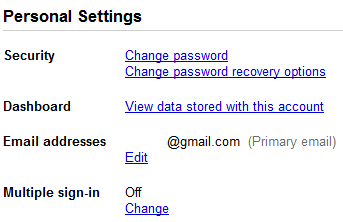
Now, you can visit google.com/accounts and click the link next to "Multiple sign-in." After you sign into your first account, you can sign in with up to two additional accounts from the new accounts menu in the upper right hand corner of Gmail, then easily toggle back and forth between them. You can even open multiple Gmail tabs — one for each of your accounts.


Please keep in mind that this is a feature for advanced users, and there are a couple things to watch out for:

1) Not all Google services support multiple account sign-in yet. For the services that don't support it (like Blogger and Picasa Web Albums), you'll be defaulted to the first account you signed in with during that browser session. So if you click a link from Gmail to Blogger, for example, you'll be logged into Blogger with the first account you signed in with, even if you clicked the link to Blogger from your second Gmail account.

2) We're still working on making Gmail and Calendar work offline with multiple sign-in. If you rely on offline access, you probably don't want to enable this feature quite yet.

3) Multiple account sign-in only works on desktop browsers for now, so if you use Gmail on your phone's browser you won't see this option yet.

Since Google Apps customers can already sign in to their accounts at the same time as their personal Google Accounts, we won't be adding this new feature to Google Apps until the new infrastructure is in place.

If you use more than one Google Account, we hope this makes you more efficient. If you have any questions, check out our help center.

Здесь вы можете:

Google Wave закрывается

По сообщению на официальном блоге Google проект Google Wave из Google Labs , открывшийся для широкой аудитории лишь в мае 2011 года, уже прекращает свое существование до конца года в качестве отдельного продукта.

Отправлено пользователем Anonymous через Google Reader:

источник: The Official Google Blog, Автор: A Googler, дата: 04.08.10

We have always pursued innovative projects because we want to drive breakthroughs in computer science that dramatically improve our users' lives. Last year at Google I/O, when we launched our developer preview of Google Wave, a web app for real time communication and collaboration, it set a high bar for what was possible in a web browser. We showed character-by-character live typing, and the ability to drag-and-drop files from the desktop, even "playback" the history of changes—all within a browser. Developers in the audience stood and cheered. Some even waved their laptops.

We were equally jazzed about Google Wave internally, even though we weren't quite sure how users would respond to this radically different kind of communication. The use cases we've seen show the power of this technology: sharing images and other media in real time; improving spell-checking by understanding not just an individual word, but also the context of each word; and enabling third-party developers to build new tools like consumer gadgets for travel, or robots to check code.

But despite these wins, and numerous loyal fans, Wave has not seen the user adoption we would have liked. We don't plan to continue developing Wave as a standalone product, but we will maintain the site at least through the end of the year and extend the technology for use in other Google projects. The central parts of the code, as well as the protocols that have driven many of Wave's innovations, like drag-and-drop and character-by-character live typing, are already available as open source, so customers and partners can continue the innovation we began. In addition, we will work on tools so that users can easily "liberate" their content from Wave.

Wave has taught us a lot, and we are proud of the team for the ways in which they have pushed the boundaries of computer science. We are excited about what they will develop next as we continue to create innovations with the potential to advance technology and the wider web.

Posted by Urs Hölzle, Senior Vice President, Operations & Google Fellow

Здесь вы можете:

вторник, 3 августа 2010 г.

Multiple sign-in теперь доступен для некоторых продуктов Google.

Функция множественного входа (Multiple sign-in), находившаяся ранее в стадии тестирования, стала доступна пользователям Google. Она позволяет одновременную работу в нескольких аккаунтах Google. В справке указывается на ограничение, что одновременный вход возможен максимально в три аккаунта. Перечень продуктов с поддержкой множественного входа пока небольшой: Google Calendar, Google Code, Gmail, Google Reader, Google Sitesсправке также фигурируют Google Voice и Google Docs (последний с пометкой "скоро")). Все перечисленные сервисы имеют SSL-шифрование. Включение функции возможно со страницы Google Accounts.

Отправлено пользователем Anonymous через Google Reader:

источник: Google Operating System, Автор: Alex Chitu, дата: 03.08.10

Google is rolling out a feature I mentioned in a previous post: signing in to multiple Google accounts simultaneously from the same browser. When you go to the Google accounts page, you might see a new option: "multiple sign-in". If you don't see the new feature, it will probably be enabled soon.


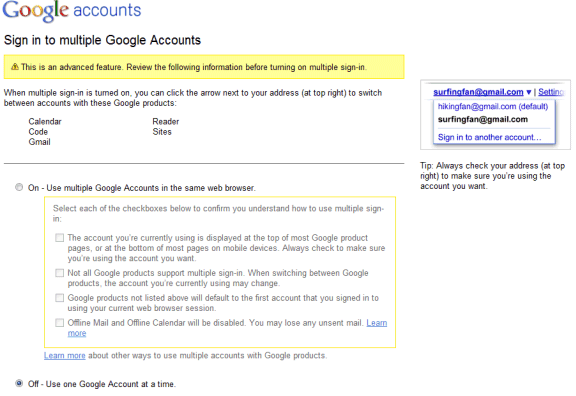
After clicking on the "change" link, Google informs that this is an advanced feature and that it will only work for Gmail, Google Calendar, Google Sites, Google Reader, Google Voice, App Engine and Google Code. When multiple sign-in is enabled, a drop-down is displayed next to your email address at the top of the page, so you can quickly switch to a new account.

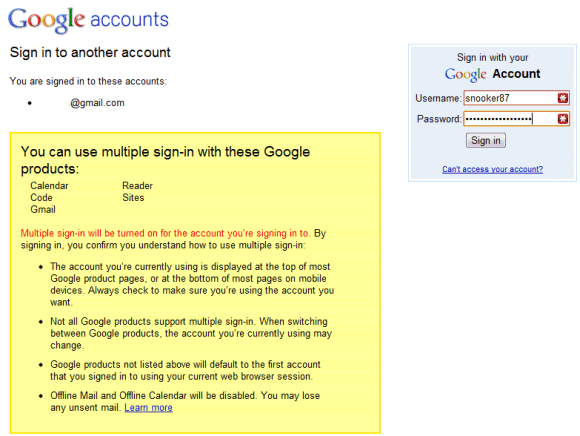
"If you use multiple sign-in, the first account you sign in to will be your default account. If you visit other Google products that don't support multiple accounts after you've signed in, you will automatically sign in to your default account for that product. If you sign out of any Google product while signed in to any account, you will be signed out of all your Google Accounts at once." (Google help center)


When you enable this feature, the most significant change is that you'll see a new drop-down next to your email address in Gmail and other supported Google products. Click on the drop-down and you can sign in to a new Google Account without signing out from the previous account.

Another change is that Google's URLs include a different number for each account: http://mail.google.com/mail/u/0/, http://mail.google.com/mail/u/1/, etc.


Google's help center explains that Google's services didn't allow you to sign it to multiple accounts at the same time using the same browser because Google uses sign-in cookies that only let you sign in with one account at a time. Obviously, you can use multiple browsers, Chrome's incognito mode, IE8's "new session" feature, multiple profiles, but the new Google feature makes things easier. Now you can read your messages from two or more Gmail accounts by opening Gmail in multiple tabs.

There are some known issues related to multiple sign-in: this feature is not available on mobile devices, Google Calendar's gadget doesn't work properly in Gmail, you can no longer use offline Gmail and offline Google Calendar and the "note in Reader" bookmarklet only works for the default account.

{ Thank you, Stefan and Max. }

Здесь вы можете: