Поиск по сообщениям в этом блоге

Loading
Показаны сообщения с ярлыком translate. Показать все сообщения

четверг, 16 декабря 2010 г.

Функция альтернативного перевода в Google Translate

Вслед за виртуальной клавиатурой, в Google Translate запущена еще одна новая полезная функция, которая позволяет использовать альтернативные переводы для каждой фразы в тексте перевода. При нажатии на переведенную фразу активизируется всплывающее меню с возможными альтернативными вариантами для этой фразы (варианты слов и словосочетаний или возможность ввести свой вариант самостоятельно), а также подсвеченные цветом соответствующие фразы в исходном тексте. Использование функции альтернативного перевода позволяет не только скорректировать запутанный и неверный перевод для потребностей самих пользователей, но и помогает Google в выборе лучших вариантов перевода в случаях, когда Google Translate допускает ошибки, совершенствуя тем самым систему статистического машинного перевода, базирующуюся на методах самообучения на основе статистического анализа.

Отправлено пользователем Anonymous через Google Reader:

источник: Google Translate Blog, Автор: Missy, дата: 15.12.10

When you come to Google Translate, we always do our best to give you the most accurate translation our system can produce. However, sometimes translation can be pretty tough. Language is full of ambiguities and our system has to do its best to make the right choices. So why choose?

We've launched a new feature to provide you with alternate translations for each phrase in the translated text. Just click the translated phrase and you'll see a pop-up menu of possible alternates for that phrase, as well as the original phrase highlighted in your original text. Not only can these alternative translations give you a better understanding of a confusing translation, but they also allow you to help Google choose the best alternative when we make a mistake.


This new feature is powered by harnessing the vast knowledge within our statistical machine translation system. Typically, when we produce a translation, our system searches through millions of possible translations, selecting the best -- that is, the most statistically likely -- translation. With this feature, we expose more of those possible alternatives. For more information about how our system works, check out http://translate.google.com/about/.


By using this feature, you can help improve Google Translate. Selecting phrase-level alternatives gives us feedback that fits well within the our system's statistical models. We hope to incorporate this structured feedback into our system, improving translation quality over time.
We hope this makes our translations even more useful to you, and allows you to help us help you find the best translation possible!

Posted by Josh Estelle, Senior Software Engineer

Здесь вы можете:

вторник, 14 декабря 2010 г.

Виртуальная клавиатура в Google Translate

В Переводчик Google, как ранее в основной поиск, добавлена экранная клавиатура, позволяющая вводить текст на нужном языке вне зависимости от того, для какого языка предназначена физическая клавиатура. Функция базируется на использовании API виртуальной клавиатуры.
Вызвать виртуальную клавиатуру в Google Translate можно нажав на значок клавиатурывнизу поля ввода.
Для некоторых языков, таких как вьетнамский или армянский, имеющих более одной популярной раскладки для местной физической клавиатуры, также поддерживается множественная раскладка и в виртуальной клавиатуре, переключаемая нажатием на стрелку вверху нее.
Виртуальная клавиатура в Google Translate доступна для следующих языков: африкаанс, албанский, арабский, армянский, баскский, белорусский, болгарский, каталанский, хорватский, чешский, датский, голландский, эстонский, филиппинский, финский, французский, галисийский, грузинский, немецкий, греческий, креольский, иврит, хинди, венгерский, исландский, индонезийский, ирландский, итальянский, корейский, латышский, литовский, македонский, малайский, мальтийский, норвежский, персидский, польский, португальский, румынский, русский, сербский, словацкий, словенский, испанский, суахили, шведский, тайский, турецкий, украинский, урду, вьетнамский, валлийский, идиш.

Отправлено пользователем Anonymous через Google Reader:

источник: Google Translate Blog, Автор: Missy, дата: 14.12.10

Today Google Translate supports translation between almost sixty languages, but typing many of those on a standard QWERTY keyboard ranges from difficult to impossible. That's why today we're happy to announce the addition of on-screen keyboards to Google Translate. Whether you're a native Georgian (ქართული ენა) speaker travelling abroad, or a student learning German with no way to type those tricky umlauts (ü), we hope this new feature will come to your rescue.

You'll notice a small keyboard icon in the bottom corner of the text input box. Click this to open a virtual keyboard for the selected input language. You can either click the letters on the on-screen keyboard, or type using your real keyboard while the on-screen keyboard is visible.

Some languages such as Vietnamese and Armenian have more than one popular layout for local keyboards. Our on-screen keyboards support multiple layouts too, and you can switch between these layouts by clicking on the arrows at the top of the on-screen keyboard

To close the on-screen keyboard, simple click the small keyboard icon again.


With this launch, we've added on-screen keyboards for these languages: Afrikaans, Albanian, Arabic, Armenian, Basque, Belarusian, Bulgarian, Catalan, Croatian, Czech, Danish, Dutch, Estonian, Filipino, Finnish, French, Galician, Georgian, German, Greek, Haitian Creole, Hebrew, Hindi, Hungarian, Icelandic, Indonesian, Irish, Italian, Korean, Latvian, Lithuanian, Macedonian, Malay, Maltese, Norwegian, Persian, Polish, Portuguese, Romanian, Russian, Serbian, Slovak, Slovenian, Spanish, Swahili, Swedish, Thai, Turkish, Ukrainian, Urdu, Vietnamese, Welsh, and Yiddish.

Some of you may be familiar with our "Phonetic typing" feature - for a few languages such as Arabic, you can type a word as it would sound in English (e.g. "marhaban"), and see the letters transformed to Arabic (e.g. مرحبا) before being translated. The new on-screen keyboards do not interfere with phonetic typing for languages that support both – when the keyboard is open, phonetic typing will be disabled.

We hope that this latest addition to Google Translate will make writing and communicating in foreign languages even easier. Please let us know if you have any feedback in our discussion group.

Posted by Frank Yung-Fong Tang, Senior Software Engineer

Здесь вы можете:

четверг, 30 сентября 2010 г.

В Google Translate добавлена латынь

В Google Translate добавлен латинский язык, который является мертвым языком, не имеющем носителей языка в настоящее время, но достаточно распространенным.
Сообщение об этом событии в официальном блоге Google представлено на латыни.


Отправлено пользователем Anonymous через Google Reader:

источник: The Official Google Blog, Автор: A Googler, дата: 30.09.10

Ut munimenta linguarum convellamus et scientiam mundi patentem utilemque faciamus, instrumenta convertendi multarum nationum linguas creavimus. Hodie nuntiamus primum instrumentum convertendi linguam qua nulli nativi nunc utuntur: Latinam. Cum pauci cotidie Latine loquantur, quotannis amplius centum milia discipuli Americani Domesticam Latinam Probationem suscipiunt. Praeterea plures ex omnibus mundi populis Latinae student.

Hoc instrumentum convertendi Latinam rare usurum ut convertat nuntios electronicos vel epigrammata effigierum YouTubis intellegamus. Multi autem vetusti libri de philosophia, de physicis et de mathematica lingua Latina scripti sunt. Libri enim vero multi milia in Libris Googlis sunt qui praeclaros locos Latinos habent.

Convertere instrumentis computatoriis ex Latina difficile est et intellegamus grammatica nostra non sine culpa esse. Autem Latina singularis est quia plurimi libri lingua Latina iampridem scripti erant et pauci novi posthac erunt. Multi in alias linguas conversi sunt et his conversis utamur ut nostra instrumenta convertendi edoceamus. Cum hoc instrumentum facile convertat libros similes his ex quibus edidicit, nostra virtus convertendi libros celebratos (ut Commentarios de Bello Gallico Caesaris) iam bona est.

Proximo tempore locum Latinum invenies vel auxilio tibi opus eris cum litteris Latinis, conare hunc.

Jakob Uszkoreit, Ingeniarius Programmandi


Здесь вы можете:

пятница, 14 мая 2010 г.

Новые языки в Google Translate

В Google Translate добавлены еще пять языков: азербайджанский, армянский, баскский, урду и грузинский. Пока эти языки доступны в альфа-версии. Общее число языков на Google Translate в результате добавления достигло 57.

Отправлено пользователем Anonymous через Google Reader:

источник: The Official Google Blog, Автор: A Googler, дата: 13.05.10

(Cross-posted from the Google Translate Blog)

At Google, we are always trying to make information more accessible, whether by adding auto-captioning on YouTube and virtual keyboards to search or by providing free translation of text, websites and documents with Google Translate. In 2009, we announced the addition of our first "alpha" language, Persian, on Google Translate. Today, we are excited to add five more alpha languages: Azerbaijani, Armenian, Basque, Urdu and Georgian — bringing the total number of languages on Google Translate to 57.

These languages are available while still in alpha status. You can expect translations to be less fluent than for our other languages, but they should still help you understand the multilingual web. We are working hard to "graduate" these new language out of alpha status, just as we did some time ago with Persian. You can help us improve translation quality as well. If you notice an incorrect translation, we invite you click "Contribute a better translation". If you are a translator, then you can contribute translation memories with the Translator Toolkit. This helps us build better machine translation systems especially for languages that are not well represented on the web.

Collectively, Armenian, Azerbaijani, Basque, Georgian and Urdu have roughly 100 million speakers. We hope that these speakers can now more easily access the entire multilingual web in their own language. Try translating these and other languages at translate.google.com. Here are some phrases from the new alpha languages to get you started:

Baietz lehenengoan
میں خوش قسمت محسوس کر رہا ہوں
բախտաւոր եմ զգում
Mən şanslıyam
იღბალს მივენდობი

Posted by Ashish Venugopal, Research Scientist

Здесь вы можете:

вторник, 11 мая 2010 г.

В Google Translate добавлены языки с речевой поддержкой переводов

В дополнение к введенному ранее звуковому переводу слов на английском, креольском, французском, итальянском, немецком, хинди, испанском, в Google Translate добавлен функционал по преобразованию текста в речь на языках африкаанс, албанском, каталанском, китайском (мандарин), хорватском, чешском, датском, голландском, финском, греческом, венгерском, исландском, индонезийском, латышском, македонском, норвежском, польском , португальском, румынском, русском, сербском, словацком, суахили, шведском, турецком, вьетнамском и валлийском на основе интеграции синтезатора речи eSpeak.

Отправлено пользователем Anonymous через Google Reader:

источник: The Official Google Blog, Автор: A Googler, дата: 11.05.10

(Cross-posted from the Google Translate Blog)

One of the popular features of Google Translate is the ability to hear translations spoken out loud ("text-to-speech") by clicking the speaker icon beside some translations, like the one below.

We rolled this feature out for English and Haitian Creole translations a few months ago and added French, Italian, German, Hindi and Spanish a couple of weeks ago. Now we're bringing text-to-speech to even more languages with the open source speech synthesizer, eSpeak.

By integrating eSpeak we're adding text-to-speech functionality for Afrikaans, Albanian, Catalan, Chinese (Mandarin), Croatian, Czech, Danish, Dutch, Finnish, Greek, Hungarian, Icelandic, Indonesian, Latvian, Macedonian, Norwegian, Polish, Portuguese, Romanian, Russian, Serbian, Slovak, Swahili, Swedish, Turkish, Vietnamese and Welsh.

You may notice that the audio quality of these languages isn't at the same level as the previously released languages. Clear and accurate speech technology is difficult to perfect, but we will continue to improve the performance and number of languages that are supported.

So go ahead and give it a try! Click the on the speaker icon for any of these translations: "airport" in Greek, "lightning" in Chinese or "smile" in Swahili.

Posted by Fergus Henderson, Software Engineer

Здесь вы можете:

четверг, 29 апреля 2010 г.

Виртуальная клавиатура в Google Search

Спустя две недели после интеграции виртуальной клавиатуры в русскоязычный поисковик Google, компания официально объявила о внедрении данной функции, основанной на API, в Поиск Google на 35 языках: албанском, арабском, армянском, баскском, белорусском, боснийском, болгарском, каталанском, хорватском, чешском, финском, галисийском, грузинском, греческом, иврите, хинди, венгерском, исландском, казахском, киргизском, македонском, малаяламском, монгольском, персидском, польском, русском, сербском, словацком, словенском, шведском, татарском, тайском, турецком, украинском, узбекском.

Отправлено пользователем Anonymous через Google Reader:

источник: The Official Google Blog, Автор: A Googler, дата: 29.04.10

You've spilled coffee on your keyboard. The a, e, i, o, u, and r keys have stopped working. Now try to search Google for the nearest computer repair shop. The pain of typing on this broken keyboard is similar to what many people searching in non-English languages feel when trying to type today. Typing searches on keyboards not designed for your languages can be frustrating, even impossible.

Our user research has shown that many people are more comfortable formulating search queries in their own language but have difficulty typing these queries into Google. (Try typing नमस्ते on a keyboard with English letters.) To overcome the difficulty they face in typing in their local language scripts, some people have resorted to copying and pasting from other sites and from online translation tools. But there's an easier way — a virtual, or "on-screen" keyboard, lets you type directly in your local language script in an easy and consistent manner, no matter where you are or what computer you're using.


Last year, to make text input easy for people across the globe, we introduced a virtual keyboard API through code.google.com. This allowed developers to enable virtual keyboards on any text field or text area in their webpages. Today, we are taking this effort one step further by integrating virtual keyboards into Google search in 35 languages.


If you use Google search in one of the languages listed below, you'll see a small keyboard icon show up next to the search field, on both the Google homepage and search results page. Clicking on that keyboard icon brings up a virtual keyboard in your language. You can input text by either clicking on the on-screen keyboard or pressing the corresponding key.

You can find out more information on how to use the virtual keyboard in our help article. If you use Google in a language not listed below and feel that your language will benefit from a virtual keyboard, let us know by voting for your language. We hope virtual keyboards help you find information more easily — especially those of you who speak/type/read in non-Latin scripts.

Languages with integrated virtual keyboards
Albanian
Arabic
Armenian
Basque
Belarusian
Bosnian
Bulgarian
Catalan
Croatian
Czech
Finnish
Galician
Georgian
Greek
Hebrew
Hindi
Hungarian
Icelandic
Kazakh
Kirghiz
Macedonian
Malayalam
Mongolian
Persian
Polish
Russian
Serbian
Slovak
Slovenian
Swedish
Tatar
Thai
Turkish
Ukrainian
Uzbek

Posted by Manish Bhargava, Product Manager Google Îñţérñåţîöñåļîžåţîờñ

A virtual keyboard on www.google.am to input Armenian text (the query term is [armenia])

Virtual keyboards let people type directly in their local language script and don't require any additional software.

Здесь вы можете:

пятница, 23 апреля 2010 г.

Google Transliteration

Инструмент Google Transliteration позволяет писать звучание слова на латинице с преобразованием его при нажатии на пробел в слово в юникоде на выбранном в меню языке. Например, набранная в латинской раскладке фраза "Pishite v latinice na russkom" будет успешно преобразована в "Пишите в латинице на русском".

Отправлено пользователем Anonymous через Google Reader:

источник: Google Translate Blog, Автор: A Googler, дата: 23.04.10

For many Internet users, it is not always easy to write in languages that use unique character sets like Hindi, Hebrew and Arabic. Most computer keyboards only allow for the input of Roman characters (the alphabet used by most Western languages) and converting between scripts can be difficult. To make this process easier we launched an improved version of Google Transliteration at the end of last year, a service which enables you to phonetically convert Roman letters into a variety of other scripts.

Today we're delighted to announce support for five new languages: Amharic, Tigrinya, Hebrew, Oriya and Sinhalese. This bring the total up to 22 languages spoken across Africa, South Asia, Eastern Europe and the Middle East. These new languages are currently available at http://www.google.com/transliterate#.

Since you can't use Google Transliteration offline we also launched the transliteration based "Input Method Editor" (IME) earlier this year. Once you download and install the Google Transliteration IME (don't worry, it's free), you can type a word the way it sounds using Roman characters and the software will convert the word to its native script. For example, typing "hamesha" in Google Hindi IME transliterates into Hindi as: हमेशा.

As an improvement to the IME, we've recently added 5 more languages (Amharic, Russian, Sanskrit, Serbian and Tigrinya) as well as canonical schemes, macros and support for Windows 64-bit. You can read about all these powerful new features on the Google Transliteration IME help page.

Now what if you come across a language that you can speak but can't read? For example, if you can speak Hindi, you may know that "namaste" is a greeting, however you may not be able to read 'नमस्ते' in Hindi script. Our new Script Converter tool converts a given web page or piece of text from one script to another so that you can read it phonetically. Script Converter currently supports 17 languages: Bengali, English, Greek, Gujarati, Hindi, Kannada, Malayalam, Marathi, Nepali, Persian, Punjabi, Russian, Sanskrit, Serbian, Tamil, Telugu and Urdu.

So, try out these tools and let us know what you think.

Posted by New Melchizedec Sundararaj, Software Engineer

Здесь вы можете:

вторник, 2 марта 2010 г.

Новая бета-версия Google Chrome: автоперевод и расширенные функции фильтрации

Отправлено пользователем Anonymous через Google Reader:

источник: Google Russia Blog, Автор: Inessa Roman-Pogorzhelskaya, дата: 02.03.10
Виланд Хольфельдер, директор по разработке, мюнхенский офис Google Team

Если в Интернете вы, например, попробуете посмотреть арабскую телевикторину, познакомиться с новейшими корейскими мобильными гаджетами или поискать информацию из первых рук о путешествии в Мачу-Пикчу, вы убедитесь в том, что Интернет — многоязычная среда. Команда Google Chrome рада предложить вам новую бета-функцию, предназначенную для преодоления языковых барьеров онлайн. Это мгновенный машинный перевод веб-страниц, не требующий установки расширений или плагинов для браузеров.

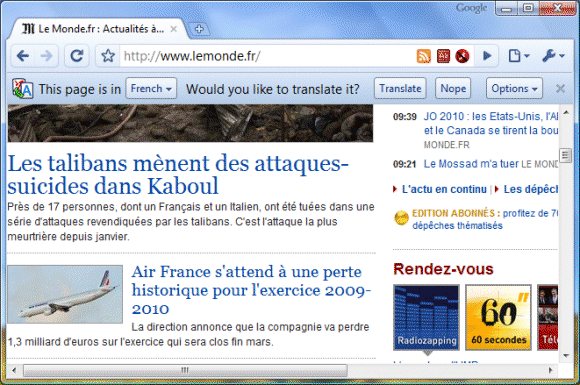
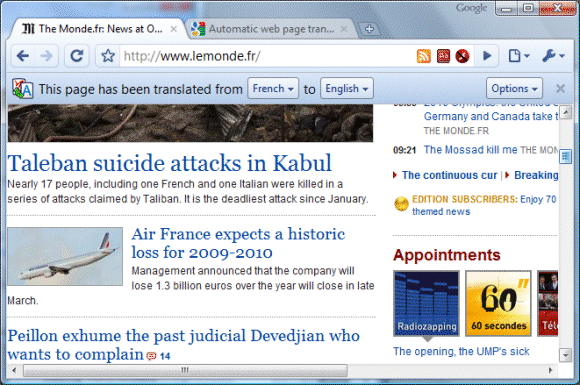
Как это работает? В тех случаях, когда язык веб-страницы отличается от ваших языковых настроек, Google Chrome выведет сообщение с предложением перевести страницу с использованием Переводчика Google.

Чтобы поближе познакомиться с работой функции автоперевода, посмотрите видеоролик одного из разработчиков функции, Джея Сивелли.


Дополнительную информацию об автопереводе в Google Chrome можно получить в разделе Справки. Мы надеемся, что появление этой функции поможет обеспечить простой, универсальный и легкий доступ ко всему объему накопленной в мире информации. Только представьте себе, что вы сможете читать множество иностранных новостных публикаций на своем родном языке, а также легко заниматься онлайн-коммерцией, перешагивая через границы и языковые барьеры.

Мы рады сообщить, что в нашем бета-релизе мы также реализуем другие функции, которые дадут вам еще больше возможностей выбора и позволят контролировать уровень защиты конфиденциальности данных при работе в Интернете. Мы отлично понимаем, что многих пользователей волнуют вопросы конфиденциальности в веб-браузерах, и поэтому подготовили небольшой видеоролик на эту тему.


Google Chrome поддерживает режим инкогнито, который позволяет просматривать веб-страницы, не оставляя при этом никаких следов посещений или истории закачек на компьютере. Помимо этого, теперь вы можете управлять установками конфиденциальности в новом блоке «Конфиденциальность» диалогового окна «Параметры». Эти настройки позволяют вам управлять файлами cookie, изображениями, сценариями JavaScript, плагинами и всплывающими окнами для каждого сайта. Например, вы можете установить правила, разрешающие сохранение файлов cookie только для сайтов, которым вы доверяете, и блокировать файлы cookie с ненадежных сайтов.

Вы можете познакомиться с этими возможностями подробнее или посмотреть видеоролики, объясняющие принципы защиты конфиденциальности в различных функциях Google Chrome, включая поиск и предлагаемые варианты, поддержку файлов cookie в браузере, технологию безопасного просмотра, а также автоматические обновления безопасности.

Здесь вы можете:

Обновление Google Chrome Beta Channel до версии 4.1.249.1021

Бета-версия Google Chrome для Windows обновлена до 4.1.249.1021.
Данная версия 4.1 создана для опробования отдельных функций, уже имеющихся в версии 5 для разработчиков:
- автоматический перевод веб-страниц;
- расширенные настройки для контроля содержания веб-страниц (cookies, изображения, javascript, подключаемые модули, всплывающие окна).

Отправлено пользователем Anonymous через Google Reader:

источник: Google Chrome Releases, Автор: Mark Larson (Google), дата: 01.03.10

The Windows Beta channel for Google Chrome has been updated to 4.1.249.1021. This update has some new features that we wanted you to be able to try before Chrome 5 is ready, so we created Chrome 4.1.

The new features are
  • Automatic translation of web pages
  • More content settings to let you control whether web sites can store cookies, load images, use plug-ins, run JavaScript or show pop-ups. You can find these new settings in under Options > Under the hood > Privacy.

The changes in Google Chrome 4.1 Beta are explained in more detail on the Google Chrome Blog.

Orit Mazor
Google Chrome Program Manager

Здесь вы можете:

пятница, 26 февраля 2010 г.

Встроенная функция перевода в Google Chrome пятой версии

В версии Google Chrome для разработчиков (начиная с пятой) появилась возможность перевода веб-страниц без установки расширений или Google Toolbar.

Отправлено пользователем Anonymous через Google Reader:

источник: Google Operating System, Автор: Alex Chitu, дата: 26.02.10
Google Chrome 5's dev build has a feature that detects the language of a web page and lets you translate it without opening a new page. The feature is borrowed from Google Toolbar, but Google Chrome is the first browser that translates web pages without requiring an add-on.

When you visit a page written in another language, Chrome shows an infobar that asks if you want to translate the web page. You can ignore the message, change the language that was automatically detected or translate the web page. If you click on "Translate", Google Chrome will translate the page and will no longer prompt you when you click on a link from the page.


"Look for the blue translation bar at the top of the page, whenever you come across a page written in a language that doesn't match the browser interface language you've selected. Translation is currently available for 52 languages. If you choose to translate a page, the text of that page is sent to Google's translation service for translation. Your cookies are not sent along with that request and, if the page you are on is encrypted with SSL, Chrome also sends the translation request over SSL," explains Google.

If you click on the "Options" button, Chrome lets you disable translation for the current language or for the site you're visiting. For now, there's no option to disable the feature or to manage a blacklist of domains and languages.

While this feature is brilliant and it work for almost any web page, including web apps like Gmail or Google Docs, I'm not sure if it's a great idea to translate pages encrypted with SSL. Someone could click on the "Always translate" option and inadvertently send confidential information to Google's servers.

To try this feature, install Chrome dev channel, a buggier and less polished version of Chrome, or wait until a stable Chrome 5 build is released. A similar implementation is available in Google Toolbar for Internet Explorer and Firefox. There's also a Chrome extension for translating web pages.

{ Thanks, Jason. }

Здесь вы можете:

среда, 17 февраля 2010 г.

Google продемонстрировал перевод слов с фотографии

Google продемонстрировал на Mobile World Congress в Барселоне прототип сервиса на основе Google Goggles, способный производить перевод текста с фотографии.


Отправлено пользователем Anonymous через Google Reader:

источник: The Official Google Blog, Автор: A Googler, дата: 17.02.10
Imagine being in a foreign country staring at a restaurant menu you can't understand, a waiter impatiently tapping his foot at your tableside. You, a vegetarian, have no idea whether you're about to order spaghetti with meatballs or veggie pesto. What would you do? Well, eventually you might be able to take out your mobile phone, snap a photo with Google Goggles, and instantly view that menu translated into your language. Of course, that's not possible today — but yesterday at the Mobile World Congress we demonstrated a prototype of Google Goggles that has the power to do just that. It's still in an extremely early stage, but we thought we'd share this demo with you because it shows just how powerful a smartphone can be when it's connected to our translation technologies. For more information and to watch the demo, check out our brand-new Google Translate blog.

Posted by Andrew Gomez, Associate Product Marketing Manager

Здесь вы можете: