Поиск по сообщениям в этом блоге

Loading
Показаны сообщения с ярлыком google reader. Показать все сообщения

четверг, 23 сентября 2010 г.

В Google Reader функция отслеживания изменений будет отключена

Google в официальном блоге сообщил, что с 30 сентября 2010 года в Google Reader функция отслеживания изменений на любом сайте больше поддерживаться не будет...

Отправлено пользователем Anonymous через Google Reader:

источник: Official Google Reader Blog, Автор: Brian Shih, дата: 22.09.10

As of September 30th, we'll be turning off track changes in Reader. While this isn't a widely used feature, we wanted to let you know in advance so you can set up a suitable alternative (such as http://page2rss.com). Your previous updates will not go away, but you will stop receiving new updates from any custom feeds you have set up.

We apologize for any inconvenience this causes -- and as always, please feel free to visit our help forum if you have any questions.


Здесь вы можете:

вторник, 3 августа 2010 г.

Multiple sign-in теперь доступен для некоторых продуктов Google.

Функция множественного входа (Multiple sign-in), находившаяся ранее в стадии тестирования, стала доступна пользователям Google. Она позволяет одновременную работу в нескольких аккаунтах Google. В справке указывается на ограничение, что одновременный вход возможен максимально в три аккаунта. Перечень продуктов с поддержкой множественного входа пока небольшой: Google Calendar, Google Code, Gmail, Google Reader, Google Sitesсправке также фигурируют Google Voice и Google Docs (последний с пометкой "скоро")). Все перечисленные сервисы имеют SSL-шифрование. Включение функции возможно со страницы Google Accounts.

Отправлено пользователем Anonymous через Google Reader:

источник: Google Operating System, Автор: Alex Chitu, дата: 03.08.10

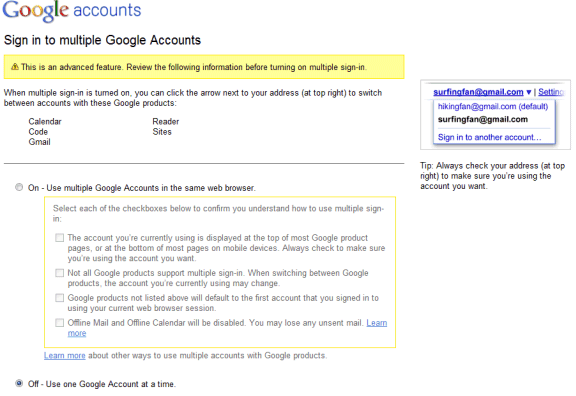
Google is rolling out a feature I mentioned in a previous post: signing in to multiple Google accounts simultaneously from the same browser. When you go to the Google accounts page, you might see a new option: "multiple sign-in". If you don't see the new feature, it will probably be enabled soon.
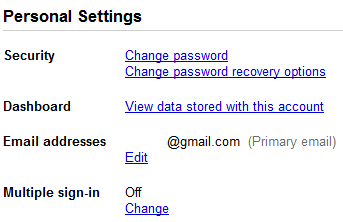

After clicking on the "change" link, Google informs that this is an advanced feature and that it will only work for Gmail, Google Calendar, Google Sites, Google Reader, Google Voice, App Engine and Google Code. When multiple sign-in is enabled, a drop-down is displayed next to your email address at the top of the page, so you can quickly switch to a new account.

"If you use multiple sign-in, the first account you sign in to will be your default account. If you visit other Google products that don't support multiple accounts after you've signed in, you will automatically sign in to your default account for that product. If you sign out of any Google product while signed in to any account, you will be signed out of all your Google Accounts at once." (Google help center)


When you enable this feature, the most significant change is that you'll see a new drop-down next to your email address in Gmail and other supported Google products. Click on the drop-down and you can sign in to a new Google Account without signing out from the previous account.

Another change is that Google's URLs include a different number for each account: http://mail.google.com/mail/u/0/, http://mail.google.com/mail/u/1/, etc.
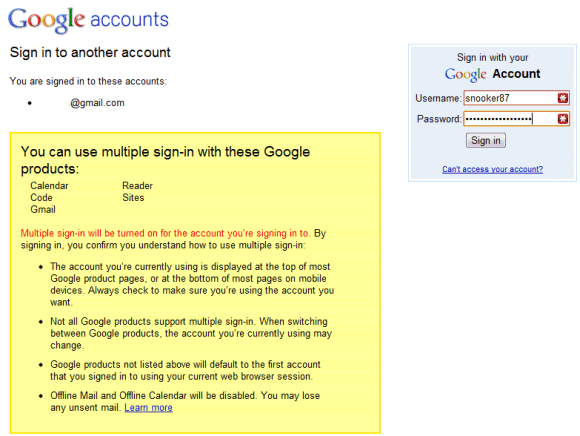

Google's help center explains that Google's services didn't allow you to sign it to multiple accounts at the same time using the same browser because Google uses sign-in cookies that only let you sign in with one account at a time. Obviously, you can use multiple browsers, Chrome's incognito mode, IE8's "new session" feature, multiple profiles, but the new Google feature makes things easier. Now you can read your messages from two or more Gmail accounts by opening Gmail in multiple tabs.

There are some known issues related to multiple sign-in: this feature is not available on mobile devices, Google Calendar's gadget doesn't work properly in Gmail, you can no longer use offline Gmail and offline Google Calendar and the "note in Reader" bookmarklet only works for the default account.

{ Thank you, Stefan and Max. }

Здесь вы можете:

среда, 2 июня 2010 г.

Изменение наименований папок и тегов в Google Reader

Недоступная ранее возможность переименования папок и тегов в Google Reader теперь реализована на вкладке настроек и из контекстного меню.
Также Google сообщил об отключении с сегодняшнего дня поддержки в Google Reader автономной работы через Gears и работы через устаревшие браузеры.

Отправлено пользователем Anonymous через Google Reader:

источник: Official Google Reader Blog, Автор: Brian Shih, дата: 01.06.10

Post by Wiktor Gworek, 20% task force (Krakow, Poland)

Last year we announced that we wanted to hear your wish list for features in Google Reader, and one of most highly requested features was the ability to rename folders and tags. Today we are rolling out this feature with a little bit of Polish help from Krakow.

You can rename folders and tags on the settings page:

Renaming on the settings page

And you can also edit these names right from the contextual menu in your subscription list.

Renaming from contextual menu

Also, as we announced last week, today we've disabled offline access through Gears, and phased out support for older browsers.

As always, if you have any questions or comments, please head over to our help forums, or send us a message on Twitter.


Здесь вы можете:

вторник, 26 января 2010 г.

Google Reader теперь может следить за изменениями на любом сайте

Google в официальном блоге сообщил о новых возможностях Google Reader: теперь в подписку можно добавлять любые веб-сайты, а не только имеющие RSS-ленту, и отслеживать изменения на этих сайтах.

Отправлено пользователем Anonymous через Google Reader:

источник: Official Google Reader Blog, Автор: Brian Shih, дата: 25.01.10
At Google we're always looking for ways to take advantage of work being done in other parts of the organization. So when a team approached us with a way to follow changes from websites without feeds, we jumped at the opportunity. Post by Liza Ma, Product Manager.

Feeds make it easy to follow updates to all kinds of webpages, from blogs to news sites to Craigslist queries, but unfortunately not all pages on the web have feeds. Today we're rolling out a change in Google Reader that lets you create a custom feed to track changes on pages that don't have their own feed.

These custom feeds are most useful if you want to be alerted whenever a specific page has been updated. For example, if you wanted to follow Google.org's latest products, just type "http://www.google.org/products.html" into Reader's "Add a subscription" field. Click "create a feed", and Reader will periodically visit the page and publish any significant changes it finds as items in a custom feed created just for that page.

Here are some more example feeds for sites without feeds that you could follow:

We provide short snippets of page changes to help you quickly decide if the page is worth revisiting and we're working on improving the quality of these snippets. If you don't want Google to crawl or create feeds for a specific site, site owners can opt-out.

If you have a feed-less page you've been dying to follow, sign in to Google Reader and try it out for yourself. As always, if you have any feedback, please visit our official help forums or our Twitter account.


Здесь вы можете: