В компании VUPEN Security утверждают, что ее специалистам удалось взломать Google Chrome, ни разу еще не взломанный на хакерском конкурсе Pwn2Own, при помощи эксплойта, обходящего все функции безопасности, включая "песочницу".
Сообщение об этом на сайте VUPEN Security представлено следующим образом:
Google Chrome Pwned by VUPEN aka Sandbox/ASLR/DEP Bypass
Hi everyone,
We are (un)happy to announce that we have officially Pwned Google Chrome and its sandbox.
The exploit shown in this video is one of the most sophisticated codes we have seen and created so far as it bypasses all security features including ASLR/DEP/Sandbox (and without exploiting a Windows kernel vulnerability), it is silent (no crash after executing the payload), it relies on undisclosed (0day) vulnerabilities discovered by VUPEN and it works on all Windows systems (32-bit and x64).
The video shows the exploit in action with Google Chrome v11.0.696.65 on Microsoft Windows 7 SP1 (x64). The user is tricked into visiting a specially crafted web page hosting the exploit which will execute various payloads to ultimately download the Calculator from a remote location and launch it outside the sandbox (at Medium integrity level).
While Chrome has one of the most secure sandboxes and has always survived the Pwn2Own contest during the last three years, we have now uncovered a reliable way to execute arbitrary code on any default installation of Chrome despite its sandbox, ASLR and DEP.
For security reasons, the exploit code and technical details of the underlying vulnerabilities will not be publicly disclosed. They are exclusively shared with our Government customers as part of our vulnerability research services.
Показаны сообщения с ярлыком chrome. Показать все сообщения
Показаны сообщения с ярлыком chrome. Показать все сообщения
вторник, 10 мая 2011 г.
понедельник, 9 мая 2011 г.
Обновление Google Chrome Beta Channel до версии 12.0
Google Chrome бета-канала для всех платформ (операционные системы Windows, Mac и Linux) обновлен с одиннадцатой до двенадцатой версии (ver. 12.0.742.30).
Основные изменения в Chrome двенадцатой версии бета-канала следующие:
• Аппаратное ускорение 3D CSS;
• Новая защита безопасного просмотра от загрузки вредоносных файлов;
• Возможность удаления flash-cookie внутри Chrome;
• Запуск приложений из омнибокса (универсальной адресной строки) по названию;
• Интегрированная синхронизация в новых страницах настройки;
• Улучшенная поддержка экранного чтения;
• Новое предупреждение при нажатии Command-Q на Mac;
• Удаление Google Gears.
The Google Chrome team is happy to announce the release of Chrome 12 to the Beta Channel for all platforms. Chrome 12.0.742.30 includes a number of new features and updates, including:
Jason Kersey
Google Chrome


Основные изменения в Chrome двенадцатой версии бета-канала следующие:
• Аппаратное ускорение 3D CSS;
• Новая защита безопасного просмотра от загрузки вредоносных файлов;
• Возможность удаления flash-cookie внутри Chrome;
• Запуск приложений из омнибокса (универсальной адресной строки) по названию;
• Интегрированная синхронизация в новых страницах настройки;
• Улучшенная поддержка экранного чтения;
• Новое предупреждение при нажатии Command-Q на Mac;
• Удаление Google Gears.
Отправлено пользователем Express через Google Reader:
источник: Google Chrome Releases, Автор: Jason, дата: 09.05.11
The Google Chrome team is happy to announce the release of Chrome 12 to the Beta Channel for all platforms. Chrome 12.0.742.30 includes a number of new features and updates, including:
- Hardware accelerated 3D CSS
- New Safe Browsing protection against downloading malicious files
- Ability to delete Flash cookies from inside Chrome
- Launch Apps by name from the Omnibox
- Integrated Sync into new settings pages
- Improved screen reader support
- New warning when hitting Command-Q on Mac
- Removal of Google Gears
Jason Kersey
Google Chrome
Здесь вы можете:
- Подписаться на Google Chrome Releases с помощью Google Reader
- Начать использовать Google Reader, чтобы быть в курсе обновлений на всех выбранных вами сайтах


среда, 27 апреля 2011 г.
Обновление Google Chrome Stable Channel до версии 11.0
Стабильная версия Google Chrome для платформ Linux, Mac и Windows (а также Chrome Frame), обновлена с десятой версии до одиннадцатой (версия релиза - 11.0.696.57).
В качестве главного изменения в стабильном релизе Chrome одиннадцатой версии на официальном блоге Chrome позиционируется поддержка речевого ввода через HTML, основанная на новых веб-технологиях в браузере. Практическое использование возможности распознавания речи с конвертацией ее в текст демонстрируется как функция голосового ввода на сервисе перевода Google Translate.


В качестве главного изменения в стабильном релизе Chrome одиннадцатой версии на официальном блоге Chrome позиционируется поддержка речевого ввода через HTML, основанная на новых веб-технологиях в браузере. Практическое использование возможности распознавания речи с конвертацией ее в текст демонстрируется как функция голосового ввода на сервисе перевода Google Translate.
Отправлено пользователем Express через Google Reader:
источник: Google Chrome Releases, Автор: Karen, дата: 27.04.11
The Google Chrome team is happy to announce the arrival of Chrome 11.0.696.57 to the Stable Channel for Windows, Mac, Linux, and Chrome Frame. Chrome 11 contains some really great improvements including speech input through HTML.
Security fixes and rewards:
Please see the Chromium security page for more detail. Note that the referenced bugs may be kept private until a majority of our users are up to date with the fix.
We're pleased to associate a record $16,500 of rewards with this patch.
We're pleased to associate a record $16,500 of rewards with this patch.
- [61502] High CVE-2011-1303: Stale pointer in floating object handling. Credit to Scott Hess of the Chromium development community and Martin Barbella.
- [70538] Low CVE-2011-1304: Pop-up block bypass via plug-ins. Credit to Chamal De Silva.
- [Linux / Mac only] [70589] Medium CVE-2011-1305: Linked-list race in database handling. Credit to Kostya Serebryany of the Chromium development community.
- [$500] [71586] Medium CVE-2011-1434: Lack of thread safety in MIME handling. Credit to Aki Helin.
- [72523] Medium CVE-2011-1435: Bad extension with 'tabs' permission can capture local files. Credit to Cole Snodgrass.
- [Linux only] [72910] Low CVE-2011-1436: Possible browser crash due to bad interaction with X. Credit to miaubiz.
- [$1000] [73526] High CVE-2011-1437: Integer overflows in float rendering. Credit to miaubiz.
- [$1000] [74653] High CVE-2011-1438: Same origin policy violation with blobs. Credit to kuzzcc.
- [Linux only] [74763] High CVE-2011-1439: Prevent interference between renderer processes. Credit to Julien Tinnes of the Google Security Team.
- [$1000] [75186] High CVE-2011-1440: Use-after-free with <ruby> tag and CSS. Credit to Jose A. Vazquez.
- [$500] [75347] High CVE-2011-1441: Bad cast with floating select lists. Credit to Michael Griffiths.
- [$1000] [75801] High CVE-2011-1442: Corrupt node trees with mutation events. Credit to Sergey Glazunov and wushi of team 509.
- [$1000] [76001] High CVE-2011-1443: Stale pointers in layering code. Credit to Martin Barbella.
- [$500] [Linux only] [76542] High CVE-2011-1444: Race condition in sandbox launcher. Credit to Dan Rosenberg.
- [76646] Medium CVE-2011-1445: Out-of-bounds read in SVG. Credit to wushi of team509.
- [$3000] [76666] [77507] [78031] High CVE-2011-1446: Possible URL bar spoofs with navigation errors and interrupted loads. Credit to kuzzcc.
- [$1000] [76966] High CVE-2011-1447: Stale pointer in drop-down list handling. Credit to miaubiz.
- [$1000] [77130] High CVE-2011-1448: Stale pointer in height calculations. Credit to wushi of team509.
- [$1000] [77346] High CVE-2011-1449: Use-after-free in WebSockets. Credit to Marek Majkowski.
- [77349] Low CVE-2011-1450: Dangling pointers in file dialogs. Credit to kuzzcc.
- [$2000] [77463] High CVE-2011-1451: Dangling pointers in DOM id map. Credit to Sergey Glazunov.
- [$500] [77786] Medium CVE-2011-1452: URL bar spoof with redirect and manual reload. Credit to Jordi Chancel.
- [$1500] [79199] High CVE-2011-1454: Use-after-free in DOM id handling. Credit to Sergey Glazunov.
- [79361] Medium CVE-2011-1455: Out-of-bounds read with multipart-encoded PDF. Credit to Eric Roman of the Chromium development community.
- [79364] High CVE-2011-1456: Stale pointers with PDF forms. Credit to Eric Roman of the Chromium development community.
More on what's new at the Official Chrome Blog. You can find full details about the changes that are in Chrome 11 in the SVN revision log. If you find new issues, please let us know by filing a bug. Want to change to another Chrome release channel? Find out how.
Karen Grunberg
Google Chrome
Karen Grunberg
Google Chrome
Здесь вы можете:
- Подписаться на Google Chrome Releases с помощью Google Reader
- Начать использовать Google Reader, чтобы быть в курсе обновлений на всех выбранных вами сайтах
четверг, 14 апреля 2011 г.
В Google Translate реализуется функция речевого ввода
После добавления в Google Chrome 11-й версии поддержки API голосового ввода, реализованного на HTML5, Google начинает внедрять использование данной функции в своих сервисах. Первой службой Google (за исключением голосового поиска для мобильных платформ), использующей функцию речевого ввода, стала Google Translate. Функция преобразования речи в текст становится доступной для английского языка, используемого в качестве исходного, при посещении Переводчика Google в браузере Chrome одиннадцатой версии или выше (Google Chrome Beta, Google Chrome Dev, Google Chrome Canary Build): в нижнем правом углу формы ввода появляется значок микрофона , при нажатии на который активируется ввод текста посредством преобразования речи, после чего производится мгновенный автоматический перевод распознанного текста.
Возможно, что в скором времени Google реализует в сервисе Google Translate подержку речевого ввода помимо английского и на других языках (подобно поддержке озвучивания текста для множества различных языков). Также не пропадает надежда, что функция речевого ввода не вытеснит собой функцию виртуальной клавиатуры, а лишь дополнит ее.
Google Chrome 11 added support for HTML speech input API. "With this API, developers can give web apps the ability to transcribe your voice to text. When a web page uses this feature, you simply click on an icon and then speak into your computer's microphone. The recorded audio is sent to speech servers for transcription, after which the text is typed out for you."
Google Translate is the first Google service that uses this feature. If you use Google Chrome 11 Beta, Google Chrome 12 Dev/Canary or a recent Chromium build and visit Google Translate, you can click the voice input icon. Right now, this feature only works for English, so you need to select "English" from the list of input languages.

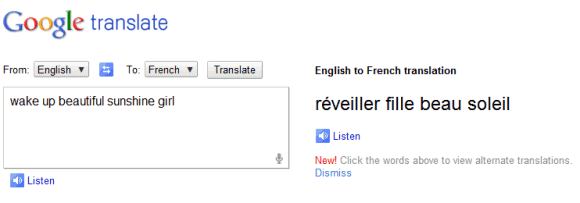
Unfortunately, the results aren't great. I tried to translate "beautiful sunshine" into French, but the speech-to-text engine didn't work properly and Google had to translate "wake up beautiful sunshine girl".
{ Thanks, Kalin. }


Возможно, что в скором времени Google реализует в сервисе Google Translate подержку речевого ввода помимо английского и на других языках (подобно поддержке озвучивания текста для множества различных языков). Также не пропадает надежда, что функция речевого ввода не вытеснит собой функцию виртуальной клавиатуры, а лишь дополнит ее.
Отправлено пользователем Express через Google Reader:
источник: Google Operating System, Автор: Alex Chitu, дата: 14.04.11
Google Chrome 11 added support for HTML speech input API. "With this API, developers can give web apps the ability to transcribe your voice to text. When a web page uses this feature, you simply click on an icon and then speak into your computer's microphone. The recorded audio is sent to speech servers for transcription, after which the text is typed out for you."
Google Translate is the first Google service that uses this feature. If you use Google Chrome 11 Beta, Google Chrome 12 Dev/Canary or a recent Chromium build and visit Google Translate, you can click the voice input icon. Right now, this feature only works for English, so you need to select "English" from the list of input languages.
Unfortunately, the results aren't great. I tried to translate "beautiful sunshine" into French, but the speech-to-text engine didn't work properly and Google had to translate "wake up beautiful sunshine girl".
{ Thanks, Kalin. }
Здесь вы можете:
- Подписаться на Google Operating System с помощью Google Reader
- Начать использовать Google Reader, чтобы быть в курсе обновлений на всех выбранных вами сайтах
пятница, 25 марта 2011 г.
Обновление Google Chrome Dev Channel до версии 12.0
Google Chrome канала для разработчиков обновлен с одиннадцатой версии до двенадцатой (ver. 12.0.712.0) для операционных систем Windows, Mac и Linux, а также для Google Chrome Frame.
The Dev channel has been updated to 12.0.712.0 for Windows, Mac, Linux, Chrome Frame.
This release contains lots of behind the scenes work (code cleanup and refactorings) in addition to numerous crash and regresson fixes.
All
You can find out about getting on the Dev channel here: http://dev.chromium.org/getting-involved/dev-channel.
If you find new issues, please let us know by filing a bug at http://code.google.com/p/chromium/issues/entry
Anthony Laforge
Google Chrome


Отправлено пользователем Express через Google Reader:
источник: Google Chrome Releases, Автор: laforge@chromium, дата: 25.03.11
The Dev channel has been updated to 12.0.712.0 for Windows, Mac, Linux, Chrome Frame.
This release contains lots of behind the scenes work (code cleanup and refactorings) in addition to numerous crash and regresson fixes.
All
- Updated V8 - 3.2.3.1
Win
- Tab Multi-Select - The ability to select multiple tabs, using the ctrl key, and applying actions (e.g. reload) to them all.
- New and improved bookmark bar animations
- Mac Confirm to Quit feature has been moved to the Chrome menu --> Warn Before Quitting
You can find out about getting on the Dev channel here: http://dev.chromium.org/getting-involved/dev-channel.
If you find new issues, please let us know by filing a bug at http://code.google.com/p/chromium/issues/entry
Anthony Laforge
Google Chrome
Здесь вы можете:
- Подписаться на Google Chrome Releases с помощью Google Reader
- Начать использовать Google Reader, чтобы быть в курсе обновлений на всех выбранных вами сайтах
среда, 23 марта 2011 г.
Обновление Google Chrome Beta Channel до версии 11.0

Основные проанонсированные в официальном блоге изменения в Chrome одиннадцатой версии следующие:
• API речевого ввода на HTML5 (использование API предоставляет возможность записи голоса в текст);
• Графическое ускорение (GPU) 3D эффектов содержимого веб-страниц с использованием CSS;
• Потерявший хромированный блеск значок Chrome.
Демонстрацию возможностей использования API для преобразования речи в текст можно посмотреть на сайте slides.html5rocks.com.
Для тестирования функции распознавания речи с преобразованием ее в текст можно, находясь в Google Chrome одиннадцатой версии или выше на данной странице, нажать на изображение микрофона в поле ввода , которое получается при использовании в коде веб-страницы простейшего <input type="text" x-webkit-speech />. Использование веб-мастерами кода в форме поискового запроса позволяет производить голосовой поиск.
Отправлено пользователем Express через Google Reader:
источник: Google Chrome Releases, Автор: Karen, дата: 22.03.11
The Chrome team is happy to announce the arrival of Chrome 11.0.696.16 to the Beta channel for Windows, Mac, and Linux.
Chrome 11 contains some really great improvements including:
- HTML5 speech input API
- GPU-accelerated 3D CSS
- The brand new shiny Chrome icon
More on what's new at the Official Chrome Blog.
You can find full details about the changes that are in Chrome 11 in the SVN revision log. If you find new issues, please let us know by filing a bug. Want to change to another Chrome release channel? Find out how.
Karen Grunberg
Google Chrome


Здесь вы можете:
- Подписаться на Google Chrome Releases с помощью Google Reader
- Начать использовать Google Reader, чтобы быть в курсе обновлений на всех выбранных вами сайтах
среда, 9 марта 2011 г.
Улучшения Google Chrome 10 версии стабильного канана
Google в Chromium Blog разместил описание основных усовершенствований в релизе десятой версии Google Chrome стабильного канала, выпущенного накануне.

Posted by Chris Evans, Google Chrome Security Team, Bernhard Bauer, Software Engineer, and Carlos Pizano, Software Engineer

Отправлено пользователем Express через Google Reader:
источник: Chromium Blog, Автор: Ian Fette, дата: 08.03.11
We're always working hard to enhance the Chrome browser with bug fixes, new defenses and new features. The release of Chrome 10 is no different, and there are some items worth highlighting:
Chrome 10: Flash sandboxing
With Chrome 10, our first cut of the previously announced Flash sandboxing initiative is now enabled by default for the Windows platform on Vista and newer. Additionally, because we automatically update Flash to the latest and most secure version, this should provide useful defense in depth.
Chrome 10: Out-of-date plug-in warnings
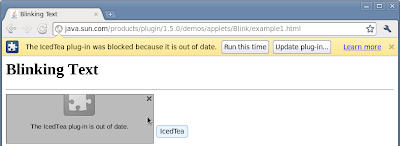
As we previously mentioned, we believe that some of the most significant opportunities to increase user security revolve around plugins. We've made a number of improvements in this area, including actively encouraging users to update their plug-ins to the most secure version. Chrome now detects when a plug-in is out of date and blocks it with a simple infobar. This infobar helps guide the user towards updating their plug-in with the latest security fixes.

Chrome 10: Plug-in blocking enhancements
Some of our more advanced users prefer fine-grained control over which plug-ins they wish to run -- which can have security and privacy benefits. Chrome has long had a feature which blocks plug-ins by default (Wrench menu -> Preferences -> Under the hood -> Content Settings -> Plug-ins). We've improved this feature by adding a context menu to the blocked plug-in placeholder. This menu lets users control which plug-ins do and do not run. Using a context menu helps prevent clickjacking attacks that try to bypass the block. Plug-in placeholders can also be hidden (for example, if they are floating over and obscuring real content), and the actual plug-in that wishes to run is made apparent.

Chromium Security Rewards program still going strong
We mentioned in passing in the 9.0.597.107 release notes that our rewards program has passed $100,000 of rewards. We'd like to re-iterate our thanks to all the named researchers in our Hall of Fame. We're continually delighted with the stream of interesting and clever bugs that we receive, so it will be exciting to see what the rest of 2011 brings. Remember, we love giving out money!
Still hiring!
We are always looking to expand the Google Chrome Security Team, and we're looking for a wide range of talents. We can promise exciting and varied work, working to protect hundreds of millions of users and working alongside the best in the industry. Why not have a look at our job posting?
Здесь вы можете:
- Подписаться на Chromium Blog с помощью Google Reader
- Начать использовать Google Reader, чтобы быть в курсе обновлений на всех выбранных вами сайтах
вторник, 8 марта 2011 г.
Обновление Google Chrome Stable Channel до версии 10.0
Стабильная версия Google Chrome для платформ Linux, Mac и Windows (а также Chrome Frame), обновлена с девятой версии до десятой (версия релиза - 10.0.648.127).
Google Chrome десятой версии содержит отдельные улучшения, в числе которых, по сравнению с предыщущими версиями, имеются следующие:
• Новая версия V8 (Crankshaft), значительно улучшающая производительность JavaScript.
• Новые страницы настроек, открывающиеся во вкладках, а не в диалоговых окнах.
• Повышение безопасности с отчетами о вредоносности, и отключение устаревших плагинов по умолчанию.
• Изолированный в Sandbox Adobe Flash на Windows.
• Синхронизация паролей в Chrome Sync включена по умолчанию.
• Ускоренное видео графического процессора (GPU).
• Фоновые WebApps.
• API расширение webNavigation.
Помимо этого, в браузере в целях повышения безопасности устранено и исправлено множество уязвимостей, что актуально накануне начала конкурса по компьютерному взлому Pwn2Own, проводимого на ежегодной конференции по безопасности CanSecWest (предварительно на попытки взлома Chrome зарегистрировано только два участника: Moatz Khader и Team Anon (по условиям конкурса хакеры-взломщики могут оставаться анонимными)).
Более подробное описание того, что нового имеется в Chrome десятой версии, можно посмотреть в официальных блогах Google The Official Google Blog или Google Chrome Blog.


Google Chrome десятой версии содержит отдельные улучшения, в числе которых, по сравнению с предыщущими версиями, имеются следующие:
• Новая версия V8 (Crankshaft), значительно улучшающая производительность JavaScript.
• Новые страницы настроек, открывающиеся во вкладках, а не в диалоговых окнах.
• Повышение безопасности с отчетами о вредоносности, и отключение устаревших плагинов по умолчанию.
• Изолированный в Sandbox Adobe Flash на Windows.
• Синхронизация паролей в Chrome Sync включена по умолчанию.
• Ускоренное видео графического процессора (GPU).
• Фоновые WebApps.
• API расширение webNavigation.
Помимо этого, в браузере в целях повышения безопасности устранено и исправлено множество уязвимостей, что актуально накануне начала конкурса по компьютерному взлому Pwn2Own, проводимого на ежегодной конференции по безопасности CanSecWest (предварительно на попытки взлома Chrome зарегистрировано только два участника: Moatz Khader и Team Anon (по условиям конкурса хакеры-взломщики могут оставаться анонимными)).
Более подробное описание того, что нового имеется в Chrome десятой версии, можно посмотреть в официальных блогах Google The Official Google Blog или Google Chrome Blog.
Отправлено пользователем Express через Google Reader:
источник: Google Chrome Releases, Автор: Jason Kersey, дата: 08.03.11
The Google Chrome team is excited to announce the arrival of Chrome 10.0.648.127 to the Stable Channel for Windows, Mac, Linux, and Chrome Frame. Chrome 10 contains some really great improvements including:
As can be seen, a few lower-severity issues were rewarded on account of being particularly interesting or clever. And some rewards were issued at the $1500 and $2000 level, reflecting bug reports where the reporter also worked with Chromium developers to provide an accepted patch.
Last, but not least, we'd like to offer special thanks (plus additional rewards to those listed above) to Christian Holler. This is for working with us on his grammar-based fuzzing project, resulting in a more stable and secure "Crankshaft" engine for v8.
More on what's new at the Official Chrome Blog. You can find full details about the changes that are in Chrome 10 in the SVN revision log. If you find new issues, please let us know by filing a bug. Want to change to another Chrome release channel? Find out how.
Jason Kersey
Google Chrome
- New version of V8 - Crankshaft - which greatly improves javascript performance
- New settings pages that open in a tab, rather than a dialog box
- Improved security with malware reporting and disabling outdated plugins by default
- Sandboxed Adobe Flash on Windows
- Password sync as part of Chrome Sync now enabled by default
- GPU Accelerated Video
- Background WebApps
- webNavigation extension API
Security fixes and rewards:
Please see the Chromium security page for more detail. Note that the referenced bugs may be kept private until a majority of our users are up to date with the fix.As can be seen, a few lower-severity issues were rewarded on account of being particularly interesting or clever. And some rewards were issued at the $1500 and $2000 level, reflecting bug reports where the reporter also worked with Chromium developers to provide an accepted patch.
- [42574] [42765] Low Possible to navigate or close the top location in a sandboxed frame. Credit to sirdarckcat of the Google Security Team.
- [Linux only] [49747] Low Work around an X server bug and crash with long messages. Credit to Louis Lang.
- [Linux only] [66962] Low Possible browser crash with parallel print()s. Credit to Aki Helin of OUSPG.
- [$1337] [69187] Medium Cross-origin error message leak. Credit to Daniel Divricean.
- [$500] [69628] High Memory corruption with counter nodes. Credit to Martin Barbella.
- [$1000] [70027] High Stale node in box layout. Credit to Martin Barbella.
- [$500] [70336] Medium Cross-origin error message leak with workers. Credit to Daniel Divricean.
- [$1000] [70442] High Use after free with DOM URL handling. Credit to Sergey Glazunov.
- [Linux only] [70779] Medium Out of bounds read handling unicode ranges. Credit to miaubiz.
- [$1337] [70877] High Same origin policy bypass in v8. Credit to Daniel Divricean.
- [70885] [71167] Low Pop-up blocker bypasses. Credit to Chamal de Silva.
- [$1000] [71763] High Use-after-free in document script lifetime handling. Credit to miaubiz.
- [71788] High Out-of-bounds write in the OGG container. Credit to Google Chrome Security Team (SkyLined); plus subsequent independent discovery by David Weston of Microsoft and MSVR.
- [$1000] [72028] High Stale pointer in table painting. Credit to Martin Barbella.
- [73026] High Use of corrupt out-of-bounds structure in video code. Credit to Tavis Ormandy of the Google Security Team.
- [$1000] [73066] High Crash with the DataView object. Credit to Sergey Glazunov.
- [$1000] [73134] High Bad cast in text rendering. Credit to miaubiz.
- [$2000] [73196] High Stale pointer in WebKit context code. Credit to Sergey Glazunov.
- [73716] Low Leak of heap address in XSLT. Credit to Google Chrome Security Team (Chris Evans).
- [$1500] [73746] High Stale pointer with SVG cursors. Credit to Sergey Glazunov.
- [$1000] [74030] High DOM tree corruption with attribute handling. Credit to Sergey Glazunov.
- [$1000] [74662] High Corruption via re-entrancy of RegExp code. Credit to Christian Holler.
- [$1000] [74675] High Invalid memory access in v8. Credit to Christian Holler.
Last, but not least, we'd like to offer special thanks (plus additional rewards to those listed above) to Christian Holler. This is for working with us on his grammar-based fuzzing project, resulting in a more stable and secure "Crankshaft" engine for v8.
More on what's new at the Official Chrome Blog. You can find full details about the changes that are in Chrome 10 in the SVN revision log. If you find new issues, please let us know by filing a bug. Want to change to another Chrome release channel? Find out how.
Jason Kersey
Google Chrome
Здесь вы можете:
- Подписаться на Google Chrome Releases с помощью Google Reader
- Начать использовать Google Reader, чтобы быть в курсе обновлений на всех выбранных вами сайтах
Подписаться на:
Сообщения (Atom)

 Сообщения

